Running Ethrex in Aligned Mode
This guide extends the Deploy an L2 overview and shows how to run an ethrex L2 with Aligned mode enabled.
For a comprehensive technical deep-dive into the Aligned integration architecture, see Aligned Layer Integration.
It assumes:
- You already installed the
ethrexbinary to your$PATH(for example from the repo root withcargo install --locked --path cmd/ethrex --bin ethrex --features l2,l2-sql,sp1 --force). - You have the ethrex repository checked out locally for the
maketargets referenced below.
Important: Aligned mode only supports SP1 proofs. The
sp1feature must be enabled when building with Aligned mode.
- Check How to Run (local devnet) for development or testing.
- Check How to Run (testnet) for a prod-like environment.
How to run (testnet)
Important
This guide assumes there is an L1 running with all Aligned environment set.
1. Generate the prover ELF/VK
From the ethrex repository root run:
make -C crates/l2 build-prover-sp1 # optional: GPU=true
This will generate the SP1 ELF program and verification key under:
crates/l2/prover/src/guest_program/src/sp1/out/riscv32im-succinct-zkvm-elfcrates/l2/prover/src/guest_program/src/sp1/out/riscv32im-succinct-zkvm-vk-u32
2. Deploying L1 Contracts
Run the deployer with the Aligned settings:
COMPILE_CONTRACTS=true \
ETHREX_L2_ALIGNED=true \
ETHREX_DEPLOYER_ALIGNED_AGGREGATOR_ADDRESS=<ALIGNED_AGGREGATOR_ADDRESS> \
ETHREX_L2_SP1=true \
ETHREX_DEPLOYER_RANDOMIZE_CONTRACT_DEPLOYMENT=true \
ethrex l2 deploy \
  --eth-rpc-url <ETH_RPC_URL> \
  --private-key <YOUR_PRIVATE_KEY> \
  --on-chain-proposer-owner <ON_CHAIN_PROPOSER_OWNER>  \
  --bridge-owner <BRIDGE_OWNER_ADDRESS>  \
  --genesis-l2-path fixtures/genesis/l2.json \
  --proof-sender.l1-address <PROOF_SENDER_L1_ADDRESS>
Note
This command requires the
COMPILE_CONTRACTSenv variable to be set, as the deployer needs the SDK to embed the proxy bytecode. In this step we are initializing theOnChainProposercontract with theALIGNED_PROOF_AGGREGATOR_SERVICE_ADDRESSand skipping the rest of verifiers; you can find the address for the aligned aggregator service here. Save the addresses of the deployed proxy contracts, as you will need them to run the L2 node. Accounts for the deployer, on-chain proposer owner, bridge owner, and proof sender must have funds. Add--bridge-owner-pk <PRIVATE_KEY>if you want the deployer to immediately callacceptOwnershipon behalf of that owner; otherwise, they can accept later.
3. Deposit funds to the AggregationModePaymentService contract from the proof sender
Aligned uses a quota-based payment model. You need to deposit ETH to obtain quota for proof submissions using the Aligned CLI.
First, clone the Aligned repository and build the CLI:
git clone https://github.com/yetanotherco/aligned_layer.git
cd aligned_layer
git checkout 54ca2471624700536561b6bd369ed9f4d327991e
Then run the deposit command:
cd aggregation_mode/cli

cargo run --release -- deposit \
  --private-key <PROOF_SENDER_PRIVATE_KEY> \
  --network <NETWORK> \
  --rpc-url <RPC_URL>
Where <NETWORK> is one of: devnet, hoodi, or mainnet.
Example for Hoodi testnet:
cargo run --release -- deposit \
  --private-key 0x... \
  --network hoodi \
  --rpc-url https://ethereum-hoodi-rpc.publicnode.com
Note: The deposit command sends a fixed amount of ETH (currently 0.0035 ETH) to the payment service contract. The contract addresses are automatically resolved based on the network parameter.
Monitoring Quota Balance
To check your remaining quota, you can query the AggregationModePaymentService contract directly:
# Get the payment service contract address for your network from Aligned docs
# Then query the quota balance for your proof sender address
cast call <PAYMENT_SERVICE_ADDRESS> "getQuota(address)(uint256)" <PROOF_SENDER_ADDRESS> --rpc-url <RPC_URL>
Monitor your quota balance regularly. When the L1ProofSender runs out of quota, you’ll see AlignedSubmitProofError with an insufficient quota message in the logs. Deposit more funds before this happens to avoid proof submission failures.
4. Running a node
Run the sequencer using the installed ethrex binary:
ethrex l2 \
  --watcher.block-delay 0 \
  --network fixtures/genesis/l2.json \
  --l1.bridge-address <BRIDGE_ADDRESS> \
  --l1.timelock-address <TIMELOCK_ADDRESS> \
  --l1.on-chain-proposer-address <ON_CHAIN_PROPOSER_ADDRESS> \
  --eth.rpc-url <ETH_RPC_URL> \
  --aligned \
  --aligned-network <ALIGNED_NETWORK>  \
  --block-producer.coinbase-address <COINBASE_ADDRESS>  \
  --committer.l1-private-key <COMMITTER_PRIVATE_KEY>  \
  --proof-coordinator.l1-private-key <PROOF_COORDINATOR_PRIVATE_KEY>  \
  --aligned.beacon-url <ALIGNED_BEACON_URL> \
  --aligned.resubmission-timeout 86400 \
  --datadir ethrex_l2 \
  --no-monitor
Both committer and proof coordinator should have funds.
Aligned params explanation:
--aligned: Enables aligned mode, enforcing all required parameters.--aligned.beacon-url: URL of the beacon client used by the Aligned SDK to verify proof aggregations, it has to support/eth/v1/beacon/blobs--aligned-network: Parameter used by the Aligned SDK. Available networks:devnet,hoodi,mainnet.--aligned.resubmission-timeout: Timeout in seconds before resending a proof not yet verified on-chain. Required when--alignedis enabled. Aligned typically aggregates once per day, so set this accordingly (e.g.86400for 24h).--aligned.from-block: (Optional) Starting L1 block number for proof aggregation search. Helps avoid scanning old blocks from before proofs were being sent. If not set, the search starts from the beginning.
If you can’t find a beacon client URL which supports that endpoint, you can run your own with lighthouse and ethrex:
Create secrets directory and jwt secret
mkdir -p ethereum/secrets/
openssl rand -hex 32 | tr -d "\n" | tee ./ethereum/secrets/jwt.hex
lighthouse bn --network <NETWORK> --execution-endpoint http://localhost:8551 --execution-jwt ./ethereum/secrets/jwt.hex --checkpoint-sync-url <CHECKPOINT_URL> --http --purge-db-force --supernode
ethrex --authrpc.jwtsecret ./ethereum/secrets/jwt.hex --network <NETWORK>
5. Running the Prover
In another terminal start the prover:
make -C crates/l2 init-prover-sp1 GPU=true # The GPU parameter is optional
Then you should wait until Aligned aggregates your proof. Note that proofs are typically aggregated every 24 hours.
How to run (local devnet)
Important
This guide assumes you have already generated the prover ELF/VK. See: Generate the prover ELF/VK
Set Up the Aligned Environment
-
Clone the Aligned repository and checkout the tested revision:
git clone git@github.com:yetanotherco/aligned_layer.git cd aligned_layer git checkout 54ca2471624700536561b6bd369ed9f4d327991e -
Edit the
aligned_layer/network_params.rsfile to send some funds to thecommitterandintegration_testaddresses:prefunded_accounts: '{ "0xf39Fd6e51aad88F6F4ce6aB8827279cffFb92266": { "balance": "100000000000000ETH" }, "0x70997970C51812dc3A010C7d01b50e0d17dc79C8": { "balance": "100000000000000ETH" }, ... "0xa0Ee7A142d267C1f36714E4a8F75612F20a79720": { "balance": "100000000000000ETH" }, + "0x4417092B70a3E5f10Dc504d0947DD256B965fc62": { "balance": "100000000000000ETH" }, + "0x3d1e15a1a55578f7c920884a9943b3b35d0d885b": { "balance": "100000000000000ETH" }, }'You can also decrease the seconds per slot in
aligned_layer/network_params.rs:# Number of seconds per slot on the Beacon chain seconds_per_slot: 4Change
ethereum-genesis-generatorto 5.2.3ethereum_genesis_generator_params: # The image to use for ethereum genesis generator image: ethpandaops/ethereum-genesis-generator:5.2.3 -
Make sure you have the latest version of kurtosis installed and start the ethereum-package:
cd aligned_layer
make ethereum_package_start
If you need to stop it run
make ethereum_package_rm -
Start the payments poller (in a new terminal):
cd aligned_layer
make agg_mode_payments_poller_start_ethereum_package
This starts PostgreSQL, runs migrations, and starts the payments poller.
-
Start the Aligned gateway (in a new terminal):
cd aligned_layer
make agg_mode_gateway_start_ethereum_package
The gateway will listen on
http://127.0.0.1:8089. -
Build and start the proof aggregator in dev mode (in a new terminal):
cd aligned_layer # Build the dev aggregator binary (uses mock proofs, no actual proving) AGGREGATOR=sp1 cargo build --manifest-path ./aggregation_mode/Cargo.toml --release --bin proof_aggregator_dev # Start the aggregator make proof_aggregator_start_dev_ethereum_package AGGREGATOR=sp1Note: The dev mode aggregator uses mock proofs for faster iteration. For production-like testing, use
make proof_aggregator_start_ethereum_package SP1_PROVER=cuda AGGREGATOR=sp1instead (requires more resources and a CUDA-capable GPU).
Initialize L2 node
-
Deploy the L1 contracts, specifying the
AlignedProofAggregatorServicecontract address:COMPILE_CONTRACTS=true \ ETHREX_L2_ALIGNED=true \ ETHREX_DEPLOYER_ALIGNED_AGGREGATOR_ADDRESS=0xcbEAF3BDe82155F56486Fb5a1072cb8baAf547cc \ ETHREX_L2_SP1=true \ make -C crates/l2 deploy-l1Note
This command requires the COMPILE_CONTRACTS env variable to be set, as the deployer needs the SDK to embed the proxy bytecode.
You will see that some deposits fail with the following error:
2025-10-13T19:44:51.600047Z ERROR ethrex::l2::deployer: Failed to deposit address=0x0002869e27c6faee08cca6b765a726e7a076ee0f value_to_deposit=0
2025-10-13T19:44:51.600114Z  WARN ethrex::l2::deployer: Failed to make deposits: Deployer EthClient error: eth_sendRawTransaction request error: insufficient funds for gas * price + value: have 0 want 249957710190063
This is because not all the accounts are pre-funded from the genesis.
-
Deposit funds to the AggregationModePaymentService contract from the proof sender using the Aligned CLI:
# From the aligned_layer repository root cd aggregation_mode/cli cargo run --release -- deposit \ --private-key 0x39725efee3fb28614de3bacaffe4cc4bd8c436257e2c8bb887c4b5c4be45e76d \ --network devnet \ --rpc-url http://localhost:8545 -
Start the L2 node:
ETHREX_ALIGNED_MODE=true \
ETHREX_ALIGNED_BEACON_URL=http://127.0.0.1:58801 \
ETHREX_ALIGNED_NETWORK=devnet \
ETHREX_PROOF_COORDINATOR_DEV_MODE=false \
SP1=true \
make -C crates/l2 init-l2
Suggestion: When running the integration test, consider increasing the
--committer.commit-timeto 2 minutes. This helps avoid having to aggregate the proofs twice. You can do this by adding the following flag to theinit-l2-no-metricstarget:--committer.commit-time 120000 -
Start the SP1 prover in a different terminal:
make -C crates/l2 init-prover-sp1 GPU=true # The GPU flag is optional
Aggregate proofs:
After some time, you will see that the l1_proof_verifier is waiting for Aligned to aggregate the proofs. In production, proofs are typically aggregated every 24 hours. For local testing, the proof aggregator started in step 8 will process proofs automatically.
If the aggregator is not running or you need to trigger a new aggregation cycle, run:
cd aligned_layer
make proof_aggregator_start_dev_ethereum_package AGGREGATOR=sp1
This will reset the last aggregated block counter and start processing queued proofs.
If successful, the l1_proof_verifier will print the following logs:
INFO ethrex_l2::sequencer::l1_proof_verifier: Proof for batch 1 aggregated by Aligned with commitment 0xa9a0da5a70098b00f97d96cee43867c7aa8f5812ca5388da7378454580af2fb7 and Merkle root 0xa9a0da5a70098b00f97d96cee43867c7aa8f5812ca5388da7378454580af2fb7
INFO ethrex_l2::sequencer::l1_proof_verifier: Batches verified in OnChainProposer, with transaction hash 0x731d27d81b2e0f1bfc0f124fb2dd3f1a67110b7b69473cacb6a61dea95e63321
Behavioral Differences in Aligned Mode
Prover
- Generates
Compressedproofs instead ofGroth16(used in standard mode). - Required because Aligned accepts compressed SP1 proofs.
- Only SP1 proofs are supported for Aligned mode.
Note: RISC0 support is not currently available in Aligned’s aggregation mode. The codebase retains RISC0 code paths (verifier IDs, merkle proof handling, contract logic) for future compatibility when Aligned re-enables RISC0 support.
Proof Sender
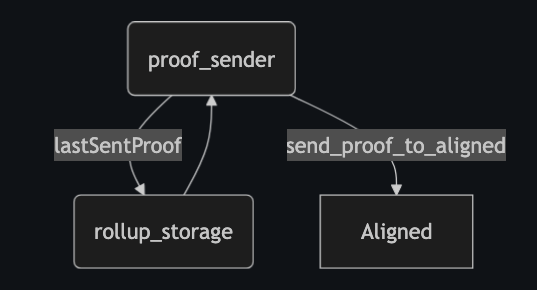
- Sends proofs to the Aligned Gateway instead of directly to the
OnChainProposercontract. - Uses a quota-based payment model (requires depositing to the
AggregationModePaymentServicecontract). - Tracks the last proof sent using the rollup store.
Proof Verifier
- Spawned only in Aligned mode (not used in standard mode).
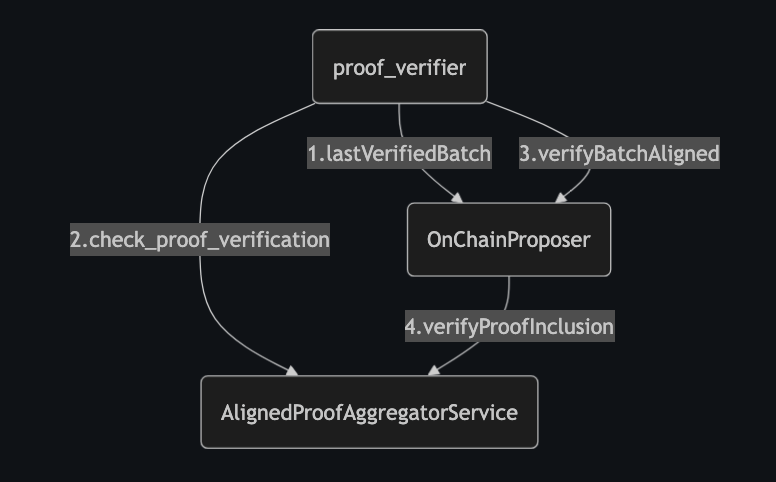
- Monitors whether the next proof has been aggregated by Aligned using the
ProofAggregationServiceProvider. - Once verified, collects all already aggregated proofs and triggers the advancement of the
OnChainProposercontract by sending a single transaction.
OnChainProposer
- Uses
verifyBatchesAligned()instead ofverifyBatches()(used in standard mode). - Receives an array of proofs to verify.
- Delegates proof verification to the
AlignedProofAggregatorServicecontract.
Supported Networks
The Aligned SDK supports the following networks:
| Network | Chain ID | Gateway URL |
|---|---|---|
| Mainnet | 1 | https://mainnet.gateway.alignedlayer.com |
| Hoodi | 560048 | https://hoodi.gateway.alignedlayer.com |
| Devnet | 31337 | http://127.0.0.1:8089 |
Failure Recovery
For guidance on handling Aligned Layer failures and outages, see the Aligned Failure Recovery Guide.